

Order Tracking
Order tracking on your site, not the carrier's.
Order tracking and status is the page your customers visit most after checkout. Corso puts it on your store instead of FedEx or UPS, and connects it to every post-purchase action: report a shipping issue, start a return, edit the order. Email notifications reach customers before they think to ask, and estimated delivery dates set expectations at checkout.
The Value
Build a relationship with your new customer.
Every WISMO ticket costs agent time and customer patience. A branded order tracking page on your site, with notifications that reach customers first, eliminates those tickets at the source. And because the page connects to returns, shipping claims, and order editing, customers can fix their own problem while they're there. If the customer actually does need help, their ticket goes to Corso Concierge - not to you.
The end of "where is my order?"
Highest-volume ticket
WISMO is the highest-volume, lowest-value work a support team handles. Corso puts shipment status, expected delivery date, and carrier details on your site, and Klaviyo notifications announce In Transit, Out for Delivery, and Delivered milestones before the customer has a reason to write in. Customers still need tracking help? Corso Concierge has you covered so you never answer another ticket yourself.
Take back the traffic
More sales
Customers check tracking 3–4 times per order. When tracking lives on a carrier site, the carrier gets those visits. When it lives in the Corso Order Hub on your store, every check-in puts customers back in front of your products and your marketing. The tracking page becomes one of the highest-traffic pages on your site - ready for upsells, cross-sells, re-sells, pre-sells, whatever kind of sells you are ready to promote to existing customers.
Put the customer in control
Zero new tickets
A standalone tracking app shows the customer where their package is. The Order Hub lets them do something about it: report a lost or damaged shipment, fix a shipping address, start a return. Every action they take here is a support ticket that never got created. And for the issues self-service can't resolve, like a lost package that needs a replacement or a claim that needs a human, the ticket routes to Corso Concierge instead of your team.
Not just a tracking app. Tracking is the front door to the whole platform: returns, exchanges, shipping claims, order editing, and warranties are one click from the tracking view. The customer looks up their order once and everything is right there.
Customer Experience
One lookup. Everything post-purchase.
The Order Hub is where customers land after looking up their order. Shipment status and order tracking details sit next to every post-purchase action the order qualifies for. Customers don't need separate pages for tracking, returns, warranties, and order editing, just one page that manages it all.
What they see
- Real-time shipment status, in transit through delivered
- Tracking number, carrier, and expected delivery date
- Items in the order, with product images
- Order number and order date
What they can do
- Report a lost or damaged shipment
- Start a return or exchange
- File a warranty claim
- Update the address or cancel the order
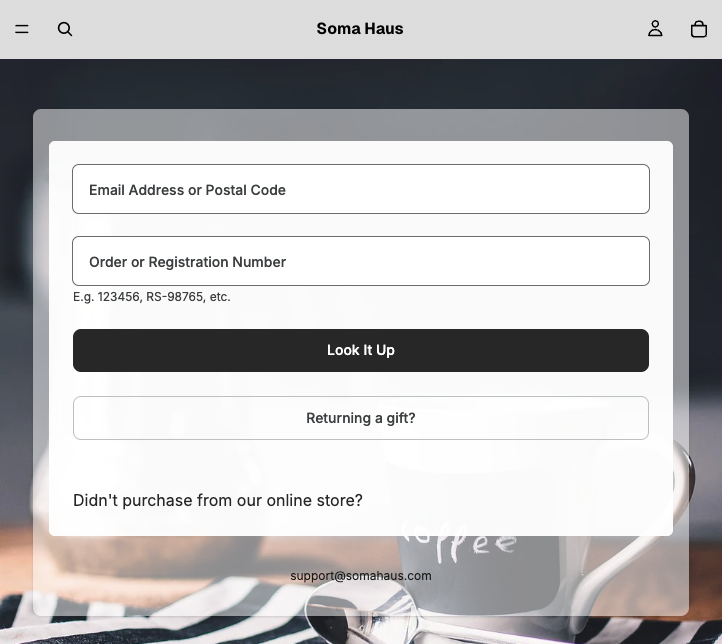
Easy lookup, or just follow a link. Customers look up their order by order number, email address, postal code, or tracking number, and gift recipients can find a gift order without the purchaser's account. Better yet, every email and notification can deep-link straight to the order, so the customer skips the lookup entirely.
Everything in one place. The Order Hub is not a tracking page with links to other tools. Tracking information and action entry points share the same screen, so the customer sees their shipment status and, right there, can act if something is wrong. One portal, not five tools stitched together.
3–4
Site tracking page visits
0
Carrier redirects in the customer experience
1
Page for tracking, returns, claims, and order edits
Notifications
Tell them before they ask.
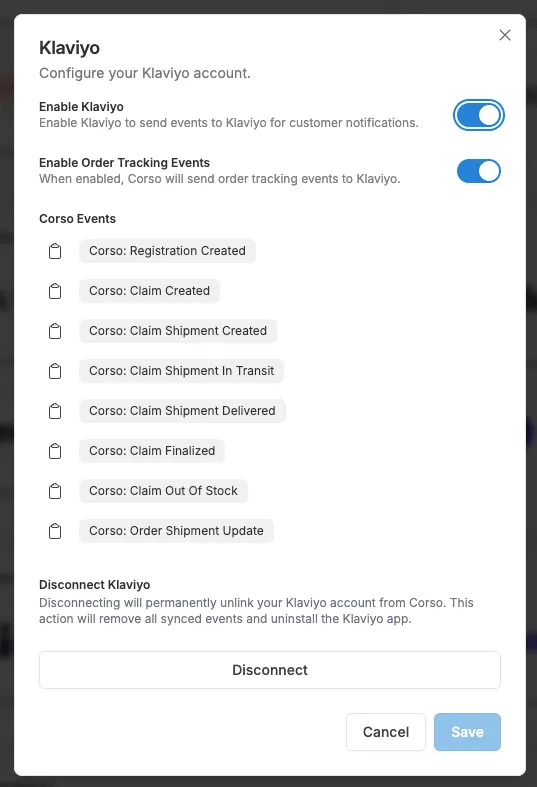
The best WISMO ticket is the one that never gets created. Corso pushes real-time shipment updates into Klaviyo and Sendlane so you can build branded flows for every milestone: In Transit, Out for Delivery, Delivered. Each email links straight back to the tracking page on your site.
Enable the integration
Toggle on your email platform in Corso Admin under Settings → Integrations, approve the Corso app inside Klaviyo or Sendlane, and turn on Order Shipment Update events.
Build your flows
Use Order Shipment Update as a flow trigger and filter by status to build separate flows for In Transit, Out for Delivery, and Delivered. Corso passes the full event payload, so every email can be personalized.
Link back to your site
Each email deep-links to the branded tracking page on your store. The customer clicks once and lands directly on their order. The email drives traffic to your site, not a carrier site.
A full payload, every milestone: The Order Shipment Update event carries the whole shipment and the order behind it, every property available for dynamic email content and flow logic.
Beyond tracking: Corso also sends claim and registration events to your email platform, from Claim Created through Delivered, Finalized, and Registration Created. Build return confirmations, warranty acknowledgements, and registration follow-ups alongside your other flows.
Shopify order confirmation emails: Conditional Liquid snippets add claim instructions and a portal link, shown only when the customer bought shipping protection. Works with Checkout Plus and Shipping Plus.
Order Shipment Update · event properties
Delivery Dates
Set expectations at checkout. Exceed them after.
When a customer sees "Standard Plus (3–7 business days)" at checkout, they know when to expect their package, and they're far less likely to ask support about it. Corso's delivery dates display in shipping rate descriptions and checkout widgets through Shipping Plus, with configurable ranges, cut-off times, and holiday exclusions.
Where dates display
- Shipping rate descriptions at checkout
- The Corso checkout extension widget
- The tracking page, alongside shipment status
- Klaviyo flows, via the shipment_estimated_delivery_on property
What you configure
- Custom date ranges, like 3–7 business days
- Carrier-provided estimates with real-time timelines
- Cut-off times based on your Shopify timezone
- Holiday exclusions from the delivery window
- Multiple named rules, each independently togglable
Conditional logic
- Vary by customer location or segment
- Vary by order value or contents
- Vary by product category or attributes
- A/B test delivery promises with Corso Intelligence test groups
Example · checkout shipping rates
Each shipping rate gets its own delivery estimate rule. Orders placed after the cut-off shift to the next business day, holidays are excluded from the window, and the customer compares shipping speed alongside protection coverage right at checkout.
This is a merchant-controlled system backed by real delivery timing, not a black-box estimate. You define the rules, name them, and toggle them independently.
Your Brand
Every pixel is yours.
The tracking experience carries your brand, not ours. Colors, logos, favicons, footer text, page titles, lookup instructions, Order Hub labels, and program names are all controlled from the Corso admin. When the portal is embedded on your Shopify store, it adopts your theme. The customer never sees Corso.

Visual & Brand
- Brand color · Primary color for buttons and content areas
- Brand logo · Displayed at the top of the portal
- Favicon · Browser tab icon
- Background image · Overrides the background color
- Footer text · Custom text at the bottom of the portal
- Portal URL · Customizable on request
Order Lookup Text
- Page title · Browser tab text
- Lookup title · Instructional text above the lookup form
- Order number description · Helper text for brands with custom prefixes
Order Hub Text
- Order Hub title · "Returns & Exchanges," "Guarantee Program," your call
- Order Hub description · Descriptive text below the title
- Program names · Replace "warranty" with "guarantee" or other terms globally
- Submission messaging · Post-submission confirmation text
Three ways to deploy it
Shopify Embedded App Block
Add the Corso Embedded UI block to any Shopify page template and the portal adopts your store's theme. The tracking experience lives on your own site, at your own URL, inside your existing header, footer, and navigation.
Headless Embed
For headless storefronts: a container div plus a script tag from cdn.corso.com renders the portal on any page. The orderId parameter can preload a specific order, and a debug mode helps during implementation.
Standalone Portal
A Corso-hosted portal at app.corso.com for brands that don't embed on their site. Still fully branded with your colors, logo, and copy. A custom URL is available on request.
Platform
One page replaces five apps.
A standalone tracking app shows the package. A returns app handles returns. A protection app files shipping claims. A warranty app processes product claims. An order editing app changes addresses. That's five vendors, five integrations, and five surfaces your customer has to tell apart. The Order Hub is one page where they do all of it.
Powered by the Order Hub. Order Tracking is the customer-facing front of the same portal that houses returns, exchanges, order editing, warranties, and shipping claims. For the full customer-facing experience across every feature, see the Self-Service Portal page.
Next Steps
Continue exploring.
Shipping Protection
Shipping claims, delivery promises, and package protection, resolved by Corso's Concierge team.
Returns & Exchanges
Full returns and exchange capabilities: automation, portal, fraud detection, exchange incentives.
Order Editing
Self-service address changes and order cancellation, powered by the same rules engine.
Warranties & Registration
Warranty programs, claim processing, product registration, and repair workflows.
Common Questions
Tracking, answered.
Does the tracking page live on my own domain?
Do I need Klaviyo to send tracking notifications?
Can customers track an order without an account?
Which carriers does Corso support?
See the tracking experience on your store.
Book a 30-minute demo. We'll show you the Order Hub embedded on your Shopify site, your notification flows wired up in Klaviyo or Sendlane, and estimated delivery dates configured for your shipping rates.